Last updated: May 25, 2026
Introduction to My Location
On June 9, 2026, the Privacy button on the app’s home screen will be renamed to My Location. This change is part of a broader UX update aimed at making the app’s location-sharing more intuitive, transparent, and easier to navigate.
Within My Location, users will see two new sections: Current Location and Location Sharing
Current Location
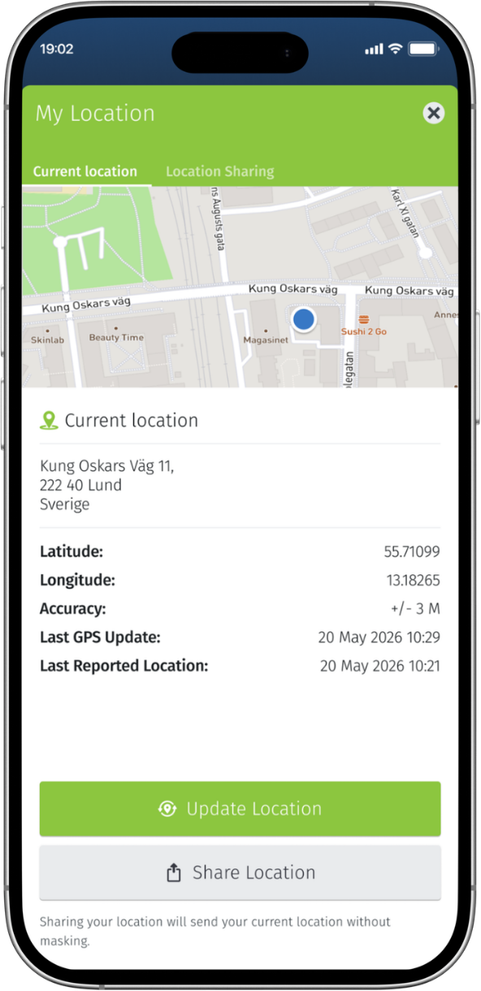
The Current Location section displays the user’s current location as detected by their phone. It always shows the exact location without location masking applied. Please note that the location shown here may differ from the location visible to an administrator in the web portal.
Last GPS update: The time when the app last received an updated location from the phone or device.
Last Reported Location: The time when the app last reported a location to the Safeture system.
Location Sharing
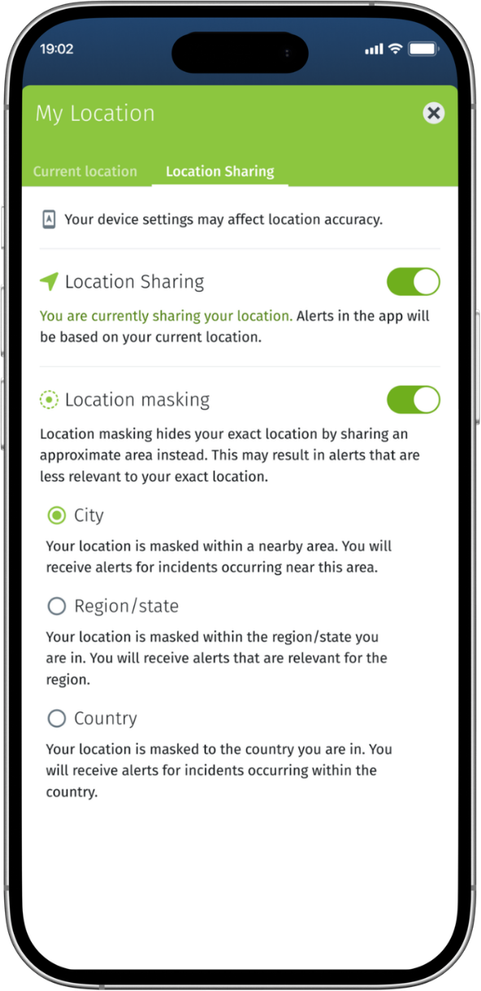
Under Location Sharing, users can manage how their location is tracked by the system. When Location Sharing is enabled, the user’s location is shared with the system and can be viewed by an administrator.
Users who enable Location Sharing will also have the option to activate Location Masking. This feature allows users to hide their precise location within a defined area. Depending on availability, users can choose to display only their city, region/state, or—in some cases—country.